

Introduction
The GeekBook X14 Pro marks a bold shift for GEEKOM, a company previously known mostly for mini-PCs. With this laptop, they step into the ultraportable notebook space, promising a rare combination: serious hardware inside a lightweight, travel-friendly chassis. The X14 Pro aims to serve users who need mobility without sacrificing performance — think developers, content creators, students, and frequent travelers.
Design & Build Quality
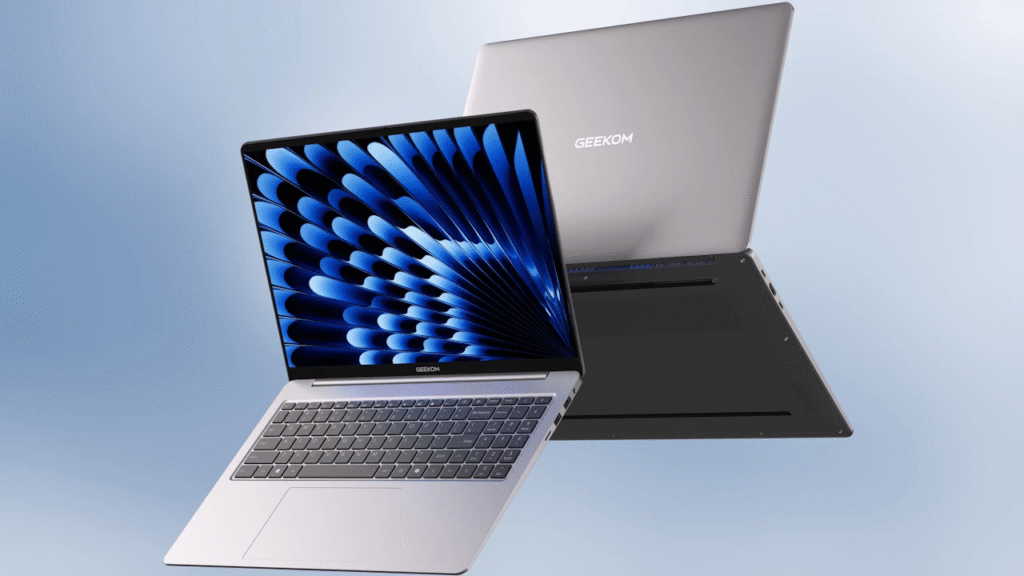
- The GeekBook X14 Pro packs a 14-inch screen in a slim, ultra-portable chassis. Its body is made of magnesium/aluminum alloy, which keeps it sturdy yet light — the whole machine weighs just ~999 g (under 1 kg). Notebookcheck+2TechRadar+2
- Thickness is modest (about 16.9 mm), and overall dimensions are compact enough for commuting, travel, or working from a café. TechRadar+2geekblog.net+2
- The build feels premium and minimalist. According to early coverage, the chassis has a “skin-friendly” texture, and the design leans toward a clean, professional look rather than flashy gamer-style aesthetics. Neowin+1
- The hinge supports up to ~135°, enough for regular laptop use, and the keyboard is a backlit 78-key layout with a large touchpad. TechRadar+1
Overall — the build quality and portability are among the main strengths: a serious attempt at a “travel-ready but powerful” ultraportable.
Performance Test (On Paper / Initial Impressions)
Since the X14 Pro is newly announced, full public benchmark data is limited. But spec-wise:
- It offers configurations with either an Intel Core Ultra 5 (225H) or a more powerful Intel Core Ultra 9 (285H), both part of Intel’s “Arrow Lake-H / Ultra 200H” family. Notebookcheck+2TechRadar+2
- Graphics come via integrated Intel Arc GPU (e.g. Arc 130T or Arc 140T depending on SKU). TechRadar+2Cyberockk+2
- RAM is soldered LPDDR5 (non-expandable), up to 32 GB, which should be more than enough for multitasking, media editing, office work, and other productivity tasks. Notebookcheck+2TechRadar+2
- SSD storage uses a single M.2 slot (NVMe), which provides fast boot and load times when equipped with a good drive. Notebookcheck+1
- The 35 W TDP CPU and integrated GPU suggest this laptop will handle everyday tasks — browsing, coding, content writing/editing, video streaming, maybe light video editing or graphics work — quite easily, but heavy gaming or long-term high-load rendering might push it. TechRadar+2TechRadar+2
- Battery: uses a 70 Wh (or around that) battery and supports fast charging via USB-C with a 65 W GaN charger. TechRadar+2GizNewsDaily+2
Given these specs, GeekBook X14 Pro seems well-suited for developers, content creators, writers, travellers — basically anyone needing a capable, lightweight laptop for productivity work more than heavy-duty gaming or 3D rendering.
Features Explanation
Some of the standout features — and what they mean in real-world use:
- 14″ OLED display, 2880 × 1800 resolution, DCI-P3 100% colour gamut: The OLED panel offers vivid colours, deep blacks, and improved contrast — ideal for photo/video editing, content creation, or watching media. The 16:10 aspect ratio gives a bit more vertical space than traditional 16:9, nice for coding, writing, reading. Notebookcheck+2TechRadar+2
- Ultra-light & thin chassis: At ~999g, portability becomes a strong selling point. Great if you travel frequently or move between workspaces.
- Modern connectivity: USB4 / USB-C, USB-A, HDMI 2.0, Wi-Fi 6E, Bluetooth 5.4 — covers most needs for external displays, peripherals, and fast wireless networking. TechRadar+2Cyberockk+2
- Backlit keyboard + fingerprint sensor: Convenient for working in low light; fingerprint sensor adds a touch of security and convenience. TechRadar+1
- Integrated Intel Arc graphics: While not a high-end discrete GPU, it’s more capable than typical integrated GPUs, so you get smoother visuals for lighter creative workloads and casual gaming. TechRadar+1
- Battery + charger: The 70 Wh battery with USB-C fast charging is great for long work or travel days. TechRadar+1
Pros & Cons
Pros
- Extremely lightweight and portable — ideal for travel or working on the go.
- Premium build with magnesium/aluminium alloy; feels sturdy.
- High-quality OLED display with vivid colour and good resolution — great for content-heavy work.
- Plenty of modern connectivity options (USB4, HDMI, Wi-Fi 6E etc.).
- Backlit keyboard, fingerprint sensor, integrated Arc graphics add to versatility.
- Sufficient RAM (up to 32 GB) and fast storage (NVMe SSD) — excellent for productivity workloads.
- Good battery life potential with a robust 70 Wh battery and fast charging.
Cons / Potential Drawbacks
- RAM is soldered — no upgrade option. TechRadar+1
- Only one NVMe SSD slot — limits storage expansion. Notebookcheck+1
- Might struggle under very heavy loads (e.g. 3D rendering, high-end gaming) — integrated GPU and 35 W TDP impose limits. TechRadar+1
- As of now, pricing and real-world availability globally is still unclear, which makes the “value” picture incomplete. Notebookcheck+1
- Since this is the first laptop from the company (known earlier for mini-PCs), long-term durability, after-sales support, and real-world performance remain to be seen.
Price & Value
- Official pricing for GeekBook X14 Pro hasn’t been publicly confirmed yet (as of the latest announcement). Notebookcheck+2Neowin+2
- There are claims from early coverage suggesting it might cost under USD 1000 — which, if true, would make it quite compelling given the specs. ADDITIONAL KNOWLEDGE+2TechRadar+2
- Judging by features (OLED display, premium build, decent CPU/GPU, lightness), if pricing is competitive, this could offer very high value — especially for users needing portability + performance without paying a premium price tag like some laptops from more established brands.
Comparison (Where It Stands Among Peers)
Compared with many ultraportable laptops today:
- Against heavier, traditional laptops — GeekBook X14 Pro likely offers similar productivity performance with a much lighter, more travel-friendly form factor.
- Compared to premium ultraportables (MacBook Air, Dell XPS 13, etc.), X14 Pro’s combination of OLED display, Intel Ultra CPU + Arc GPU, and sub-1 kg weight give it a unique edge — especially if price stays below industry-leading ultraportables.
- Against laptops with discrete GPUs — X14 Pro won’t beat them in raw rendering or gaming power, but for everyday work, creative work, and media tasks, it delivers a balanced tradeoff between performance and portability.
- Among “first-generation” devices from a newer entrant (i.e. company known for mini-PCs) — there’s some risk compared to established laptop makers, but the specs are ambitious, which sets it apart as a bold first attempt.
Final Verdict
GeekBook X14 Pro is a refreshing entrant in the ultraportable laptop segment. It strikes a thoughtful balance: a premium, lightweight build; a high-quality OLED display; modern internals capable of handling everyday productivity and creative tasks; and mobility that’s hard to match.
For someone like you — a frontend developer or content creator who often switches between workspaces, writes blogs, manages social media — this machine could be a very good fit. It’s especially ideal if you value portability without compromising too much on performance.
That said, if your work involves heavy GPU-intensive workloads (like serious video editing, 3D work, or gaming), the integrated GPU and soldered RAM/storage limitations might be a bottleneck. Also, since the laptop is newly launched, real-world reliability and availability (especially in your region) will matter.
In short: GeekBook X14 Pro is a promising ultraportable — likely among the best “portable yet capable” laptops of its launch period — but a final decision should wait until you confirm availability, pricing, and real-world reviews.
#Geekom #GeekBookX14Pro #LaptopReview #TechReview #Ultrabook #LightweightLaptop #OLEDDisplay #IntelCoreUltra #ProductivityLaptop #TechGuide #Anlation #Carrerbook
Also Check This :